
I did some surgery on my Powerbook 160 last night. Apple, in its wisdom 20 years ago, soldered the clock battery to a daughtercard, and from all I’ve read the machine won’t boot if the batteries are dead. So I busted out the iron and got the original battery off (with some difficulty), then put a new one in. Unfortunately it still didn’t come on. No bong, no whine, nothing. I have a working G3 Pismo in the basement for any OS 9 needs, but it would be fun to have an working monochrome Mac in the house, for old time’s sake.
Rooting through the basement a few weeks ago, I stumbled across a tupperware full of unused black and white film. Never one to waste money or pass up a challenge, I dusted off my Minolta X-700 and found it, too had dead batteries. With the clock battery order I got two new cells for the camera, and dropped them in. It fired right up and I started shooting pictures again. Having practiced about 10,000 digital shutter actuations on the D70, I knew exactly how to use it, and I’m hoping the film is still good so that I can develop some film. I have a scanner at work with a negative attachment, so I’m going to plug that in tomorrow and try it out. If I get good results, I’ll start scanning boxes of negs we have sitting around the house.

This Minolta is actually my second. My father has always been a camera nut, and he bought me the first when I left for college. I used it through most of my freshman year, until my asshat second-semester roommate invited a homeless thief to stay in our apartment for a few days. Predictably, it went missing. My dad replaced it that summer with a new one, and it served me well through four years of college and afterward as my primary camera until I bought my first digital. It’s a shame I didn’t learn to master it then as much as I wanted to, but I hope I can now use my digital experience to improve my film skills.
So we can only have five computers authorized for Home Sharing and visible to the AppleTV, which makes using my work computers and home computers difficult. I’m trying to bridge the gap, and this thread might help.
We have about three years of Flip video we can’t watch on our AppleTV because the Flip file format (a strange AVI variant) won’t load in iTunes, Handbrake, or most other conversion applications. I found MPEG Streamclip, a video converter for Mac OS X, which looks dodgy when judged upon the website, but which works like a charm in practice.
Interesting. Our music server in the basement can’t stay up and running for more than a day without disappearing off the network completely; some sleuthing reveals the iTunes (10.5) database getting is continually getting corrupted. This drives me nuts and Jen even nuttier—she’s the one working from home. Apple’s boards are predictably quiet about my problem, so I had to do some heavy Google-fu to find answers elsewhere. This one looks promising: Deleting the Genius database.. The author goes on to suggest turning Genius off completely, because it seems to the the root of iTunes evil. So I know what I’m trying this evening.

How did I spend my three-day weekend? I organized. Picking up where I left off over the Christmas break, I cleaned up piles laying around the basement earmarked for donation, disposal, or consolidation. The Scout is loaded up with a pile of crap to go to the dump (along with our Christmas tree, which never got taken by the County even though it was on the curb within the week specified). I moved my new tool chest, a gift from my father, into a new open space and consolidated two toolboxes, two tool caddies, an entire workbench, and one shelf of handheld electrical tools into one easy-to-access area. I pulled an ancient section of pegboard out of the attic, painted it white, and backed the second half of the tool bench to get oddly shaped and easily lost items off the bench and into view. I still have a mountain of small hardware bags that need organization as well as a crate of loose hardware in jars from my father, so I’m going to have to buy a plastic divider box or two and sort through all of that to get it out of the way. It’s kind of a shock to go down there and see so much open space again.
I also inherited a couple of old Macs from work: a white G4 iBook and a G3 Pismo Powerbook, both models I formerly used to own. The iBook may become Finn’s computer (it’s between that and the lampshade iMac) and the Pismo will be my backup OS9 machine. Spurred on by my burst of OCD, I made a Google spreadsheet with all of our house Mac information to keep things straight, and for insurance purposes. In digging through hardware, I found my Powerbook 160 is refusing to start, so I did some sleuthing and found that a dead PRAM battery is usually the culprit–especially since the machine was working when I got it. So I pulled it apart and hunted down a replacement.
I brewed a Nut Brown ale on Saturday night, knowing both my kegs are close to exhaustion. It went easily–it’s hard to fuck up an ale, really–and my starting gravity was only off by .002%. So I should have something new to drink in about four weeks. Next up will probably be another batch of Chinook IPA.
Sunday was game day, and it did not disappoint. I was pleasantly shocked at the outcome of the Patriots/Ravens game, frankly, because I figured it would end like most Baltimore playoff games do, but it’ll be good to see them in the Superbowl again. We had C&G come over to grill up some food and watch the game, and the whole thing was really good. As always, I’m going to be sad to see the season over with, no matter what happens in two weeks.
Meanwhile, with the temperatures plunging into the single digits, we are battling our local mouse population, which has been much more active in the last few months. The first night I put out traps with dabs of peanut butter and we got one kill, but they wised up after that. Last night I made improvements to our arsenal by tying small pieces of chorizo to the bait arms on our traps, and within an hour or two we got another one. There was no other movement after that, so I may need to switch to cheese or some other smelly foodstuff, but it’s nice to know my theory worked.
This year, as in previous years, I got a gift certificate to Best Buy at our holiday Christmas party. I decided to spend it on an AppleTV, something I’ve been looking at buying since they came out in 2007.
Having plumbed the pole in our den with expandability in mind, it was simple to hook up. I had already run extra power and network cabling out there, and the HDMI cable goes right into the back of the TV. Eventually, when I’m able to afford a decent head unit with HDMI input/output, I’ll move everything off the pole and back onto the cabinet and use the head to switch between inputs (FIOS, AppleTV, XBOX). But for now, it works great. It’s resting on the top of the TV right now, but a few strategically placed zip ties should hold it securely until it makes the move.
I set up my Flickr, Netflix, Vimeo, and iTunes accounts in minutes. Picture quality for Netflix was marginal (I tested an episode of Mythbusters, so it may improve with true digital movies, or there may be a setting I’m missing). We sat and looked through Finn’s Flickr set as a family before heading off to bed last night, although we can’t watch videos posted there. Stupid Flash.
Setting up iTunes was pretty easy; it requires activating Home Sharing in iTunes, which then makes it discoverable by AppleTV. Paging through music and movies is easy at that point. One caveat: The furthest back AppleTV can connect with iTunes is version 10.5 (roughly Leopard). Sharing pictures is a little trickier, because it requires finding and enabling a somewhat hidden feature within iTunes to share photos in iPhoto. Once I’d done that, I could browse everything on my hard drive.
The G5 server in our basement has been finicky sharing its iTunes library, requiring multiple library rebuilds, but I found a really easy method for doing so. I did sort out a good way to share video without importing them into iTunes (thereby making iTunes that much slower): deselect the “Copy files to iTunes Media Folder when adding to library” setting in Preferences -> Advanced. I also found that iTunes doesn’t like AVI files, which means we have four years worth of Flip movie files that need to be converted to be shared. Yuck. Fortunately, I finally found a good .m4v converter called Adapter which converts .FLV, .MOV, .AVI and other formats without fucking up the sound, which is a godsend. Now I need to dig out that disc of Venture Brothers episodes and convert them all to .m4v.
The iPhone Remote application was also easy to sync up once I’d enabled Home Sharing, and in a lot of ways it’s easier to use than the supplied remote (which I predict will go missing within a week). It’s simple, it does what it says, no muss or fuss. I haven’t tried any AirPlay features on the set yet, but I’ll give that a try this evening.
One future solution to the sharing problem that I’ve been considering is a NAS box in place of the server. A bunch of research I did yesterday points to two consumer-level products at the $300 price point: the QNAP TS-219 and the Synology DS213. Each are two-bay enclosures with an integrated processor and on-board web service to share files. The most important features I need are AFP, Time Machine compatibility, and iTunes audio and video streaming. The QNAP is missing Time Machine functionality, while the Synology has Time Machine built in and an iTunes server available as an app. I’m a little dubious about the app, but I’m going to do some more research and see what reviews it’s getting. I’d love to be able to ditch the G5 and go with a managed box, especially because a new Intel Mac Pro is north of $2K and I never see them come up on Craigslist.
So, overall I’m very happy with the AppleTV. The ability to stream Netflix movies, access movies and music from our home server, and pull photos down from Flickr is awesome. With a few more tweaks, I think it’ll be perfect.

I’ve never owned a new car in my life. By “new” I mean “walk into the dealer, pick out a model, choose a color and engine and asswarmers and 8-track player and floormats, write a check, and drive out with 10 miles on the odometer” new. All my cars have been hand-me-downs, used and abused orphans, auction items, or classified ad purchases. I don’t trust dealers all that much based on anecdotal evidence and first-hand experience.
It was with some trepidation, then, that I handed my keys to the service guy at our local Honda dealer this evening. The dealership itself is clean, and he certainly was friendly. I began telling him my problem and he finished my sentence, assuring me the car was still under warranty. He even asked if I’d like the car back by tomorrow evening, if they confirmed the issue.
A couple of years ago, my 3-year-old MacBook Pro battery began swelling unexpectedly. The machine itself was a refurb, out of warranty, so I was expecting to have to buy a new one, but on a whim I brought it in to the Apple Store and showed it to the Genius behind the bar. He took one look, went in back, and exchanged it for a brand-new one. No questions, no hassle.
It feels good to get that kind of support for a purchase. I hope this Honda dealer follows through like the Apple guy did, because I really want to believe loyalty is worth something these days.
Update: They called this afternoon and they’re replacing the actuator under warranty.
Update Update: Got it back on Saturday, and it seems to be working correctly. They didn’t vacuum the floor mats, though…
File this under Handy For Future Use: How to make a bootable Mountain Lion install drive.
I want a small Applescript or Automator function to do one thing, very simply. I want to be able to drop a folder full of images on a workflow and have it generate one page of HTML per image, each one linking to the next, all in the same folder. Easy peasy. I don’t want to have to run a fucking shell script or remember how to program in Perl; this is 2012 and I should be able to use the tools supplied to build my own standalone app.
I spent about three hours this afternoon looking for a script I could hack apart, an automator function I could repurpose, or a forum explanation that I could start with. I had no success. Apple seems to have deprecated their support for Automator and Applescript (go look for it on their site right now; I’ll wait) to the point where all I can find are 4-year-old third party sites focused on scripting iTunes playlists.
God, I hate it when I can’t figure something like this out.
Update: As noted below, Jason is on the case. It’s a Ruby executable script available here.
I’m a little (well, a lot) hung over this morning; I helped my neighbor fire up his first batch of homebrew last night, and we kicked it off with a bottle of something that kicked me. All I remember of the label was that it was 11.9% ABV, which is enough to make me silly; then we shared a bottle of Pearl Jam Twenty, which was tasty but not my favorite. The brew went really well; he has a new floor-standing propane burner and we stood around it shivering in the garage, then transferred it into the fermenter as the Ravens started losing in the second quarter.
In related news, my batch of Dead Ringer IPA is just about ready for a move to the secondary fermenter, and if all goes well I’ll finally have the hose and tank setup sometime this week. I have to buy a jar of commercial cleaner and get my keg washed and resealed for the batch when it’s ready, but that can wait until the week after Christmas.
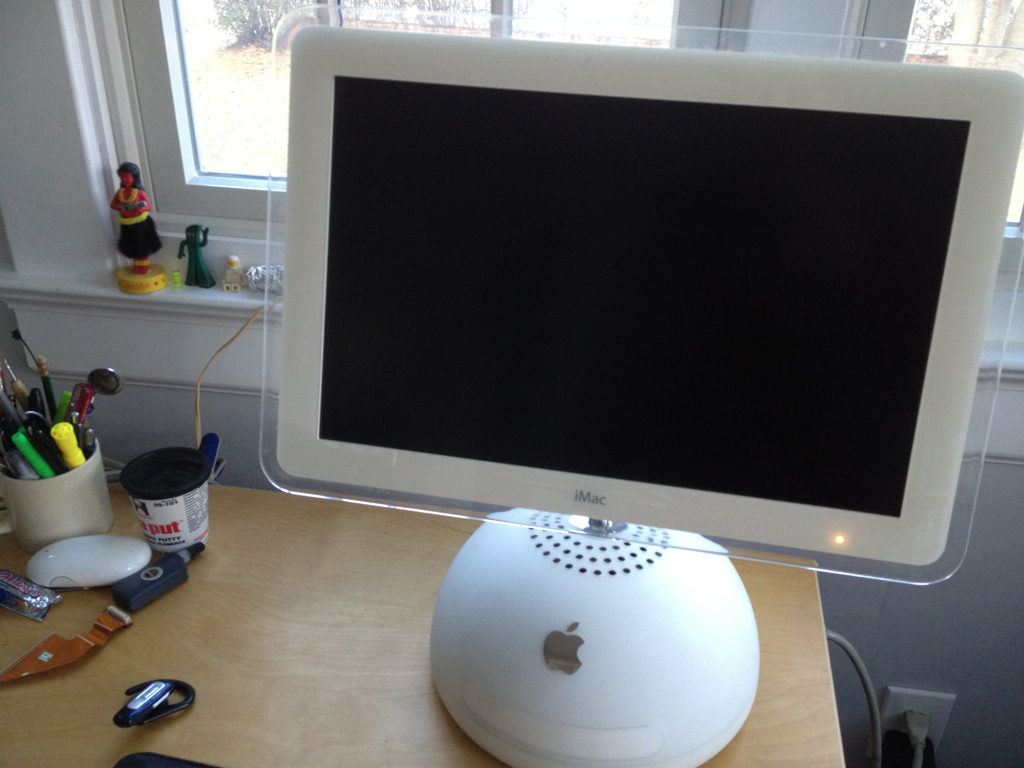
This is the latest addition to the home computer fleet: a used (and free) Lampshade iMac, circa 2002. I’ve already had it torn down once to drop a new hard drive in, and it will need a new optical drive as well (the unit it came with is not reading discs). It can only run up to OS 10.4, but it recognizes large drives and has a built-in monitor, so I’m going to repurpose it as a music server and swap out the trusty old G4 tower sitting under my desk at work.
Sunday afternoon I started work in the coal cellar putting up studs for insulation. I noticed a huge temperature drop the first time I opened the door, so I know it’s still not sealed up properly. The first order of business was to mix up a bunch of hydraulic cement and plug numerous little holes in the foundation as well as a crack running down the wall from the corner of the coal chute. Once that was done, I installed studs along the east wall and got about 1/2 of the south wall done before I ran out of lumber. I figure about four more 2×4’s and two rolls of new R-19 should do the trick. I also stuffed the coal chute full of insulation and found a sheet of plywood to nail up over the opening to cut off the airflow. Once the wall batts are up, I can put the overhead insulation back in place and call that room sealed. Then, hopefully, the den will stay warm.