
Yesterday, in a bit of cosmic irony, I spent seven hours onsite trying to untangle a client’s backup system (Retrospect, you lovable, miserable bitch, you) while here at the house our seven-year-old DSL router, a SMC Barricade, decided to finally bite it and stop switching packets.
The “Backup Solution”, a Belkin wireless router I got in trade somewhere, is servicable, but I’m now faced with the strange phenomena of downlink hubs that suddenly don’t work anymore. All of this means that the Lockardugan Command Center is wireless until we can get a new router on the case–looks like I’m making a trip to the Office Depot this afternoon.
Things I’ve learned as an (un)official tech support contractor:
- There will never be any documentation. Usernames, passwords, machine specs, repair histories, netowrk diagrams…the list goes on and on.
- The first 1/3 of my time at a new client’s office is always spent trying to figure out just what the hell is going on.
- I’ve followed a consultant who routinely recommends, purchases and installs software, and then leaves with every scrap of hard copy and media. No kidding. If I was advised to spend $1K on a piece of software, I’d better have every damned disc, manual, and box it came with sitting on my desk when the lights get turned off.
- Clients are ridiculously grateful when I fix something and take the time to answer their questions politely. I think they are amazed that I am not a raging asshole like other IT people they may have worked with in the past.
- Never be caught without one of every cord, widget, and utility. It beats a long round trip back home.
- Clients are also grateful when I supply them with a list of things I’ve done-new passwords, updated software, repaired hardware, and recommendations for future work. It seems like a no-brainer to me, but apparently it’s kind of a rarity.
- I have seen some very sad computers in my brief career. Today I worked on a PowerBook that had the numbers worn off 3/4 of the keys. It made entering passwords very interesting. A corollary: Macs are tremendously resilient machines.
- Most people don’t have a backup solution. And if they do, there’s something wrong with it.
- As an outside contractor, I can leave whenever I want to, and I don’t have to worry about being interrupted at my desk to go take care of something.
Given all that, I like working on Macs as a sideline job. It’s a nice switch from sitting behind a desk, and it seems to stimulate the problem-solving part of my brain that likes to organize and fix things. It also means I’ll be at a design or print shop, and that means the people are interesting and fun.
We’re back for a whirlwind couple of days before we leave again, this time to Ohio for a graduation which might not even happen. (More details on this as we get them.)

Getting upstate to see the family was great, and long overdue. My parents hosted my grandfather’s birthday party at their house, and apart from a minor crisis involving aluminum foil, butter, and forty ovens worth of smoke, everything went off without a hitch. The weather even cooperated enough for us to get a few peaceful, warm hours on the front porch, something I always look forward to when we’re up there. Grampy enjoyed the party and kept us laughing through the entire celebration, even though he hasn’t changed the battery in his hearing aid this year and is as deaf as a post. Luckily he always had one of his children sitting with him and translating whenever anyone posed a question from across the room.
Back here in Maryland, we have finally picked up our new rug for either the blue room or our bedroom, whichever it looks best in. Choosing carpet is difficult at best in flourescent light, with small paint chips, and under the watchful, predatory eye of the carpet salesman, so we narrowed the possibilities down to two rooms. Unfortunately, the room it’s most likely to go into is also one of the least used rooms in the main section of the house.
I’ve spent the last two days alternating between paying work and computer maintenance; the parts for Jen’s Powerbook came in while we were away, so I stripped it down to the bare frame to replace the DC/power board and both display cables. I spent many nervous hours consulting various manuals and writing notes to myself while organizing tiny screws in yogurt containers. Strangely enough, what took me about six hours to disassemble took only two to reassemble, and it was with a deep breath and a long prayer to the Sky Pilot that I pushed the power button. I got the lovely startup chime, a few minutes of nothing, and then…the same two-thirds-black screen I had before I started.
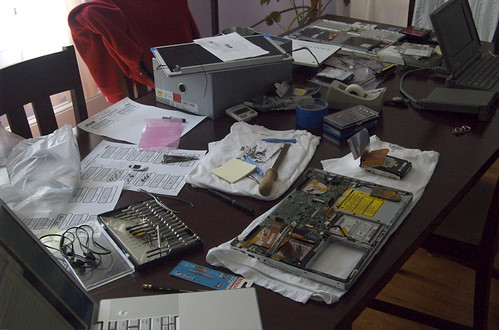
Rooting around for answers, I’m hearing that it’s the LCD itself from a parts vendor ($300), or could be the inverter board itself, the only part I didn’t replace ($60) when I had the monitor assembly open. I’m now about $500 into this thing and the prospect of spending another $300 does not please me.
However, we did find a workaround for Jen to be able to run InDesign CS and CS3 on the same machine (to recap, CS3 takes control of all InDesign documents regardless of their creator version after it is installed and run for the first time, making it impossible to re-edit them in CS) by creating a second user on the same machine and using CS as that user. Not elegant or ideal, but it gets the job done for now. Adobe gets the big Middle Finger for that one.
Meanwhile, I have been afflicted with record-player disease for the past few weeks: this is when a snippet of one song repeats endlessly in the back of my head, all day long. Last week, it was Rental Car by Beck, which wasn’t so bad, but this week I got the chorus to a Counting Crowes song stuck in my noggin when we heard it in the Korean grocery. I hated this band when they were big, and now I am cursed with the melody of their second-rate hit day and night. It got so bad yesterday that I stayed up until midnight to try and resuscitate our music server, which suddenly up and died a few weeks ago. From what I can tell, it stopped booting completely, so I transplanted the drive into a spare, only to be met with a flashing questionmark. This was too much to deal with at midnight, so I tested the third machine and realized it was my old work music server, the one with about 65% of my collection on board. Good enough! The main drive with all our music is fine, but it just won’t boot in that particular machine. Strange.

I use an older Windows-based program called HomeSite daily to do my heavy lifting when I’m building sites, with a liberal sprinkling of Dreamweaver and some BBEdit for the things HS can’t do. When I heard that Panic, the shop behind Transmit (an excellent FTP client for OS X) just came out with Coda, billed as a new editor/ftp client/reference app all in one, I was very interested.
I’m downloading it now to give it a test spin this week-it’s always hard switching from one workflow to the next, but I like the reasoning behind creation of the app: …our web workflow was wonky. We’d have our text editor open, with Transmit open to seave files to the server. We’d be previewing in Safari, running queries in Terminal, using a CSS editor, and reading references on the web.
This sounds much like my workflow—I’ve usually got Parallels running HomeSite and Explorer in a virtual window, Safari and Firefox open for testing in OS X, Transmit to upload (HomeSite’s “built-in FTP client” is a joke) and another two or three browser tabs open for reference. (Plus Photoshop, Illustrator, and/or ImageReady.) Usually I’ll offload some of the testing and viewing duties to a secondary machine, usually the Thinkpad to my left, so that I don’t have to continually cycle through windows to see what I need. But that’s clunky, and it takes time to set up each workflow—especially when I’m cycling through multiple projects like I often do on a daily basis. One of the promises of this new app is that workflows are saved exactly as they are left, so one would be able to pick up right where one left off on a day-to-day basis. (This feature is implemented somewhat crudely by HomeSite, but not in a way I’ve been able to make useful.)
While I usually have a strong dislike for having multiple UI views in one app, I’m interested to see how Coda handles all of these functions and how Panic implemented them. I hope they have some kind of quick key for tabbing through views so that I don’t have to rely on the mouse to move around. I also hope it’s more stable than Dreamweaver, which still acts like a narcoleptic teenager.
More thoughts as they come-I’ll give it a test run tomorrow morning.
Update 4.25: I played with it for a while yesterday, and while it’s fast, and clean, it didn’t light my fire as much as I was hoping. I think this is due partially because I’m entering the middle of a project as opposed to starting a new one with it; it’s got a lot of nice features that I could use, but I’ve not had enough time to really find them all yet.
I’m beginning to see now why the $300 Powerbook was $300. When I first picked it up, the screen was fine, but I noticed some play in the hinge clutch—not anything to worry about, I figured, because Jen’s Pismo had an equal amount of play and it’s always been fine. (I also noted that the case on this G4 has been opened at least once, because there are two screws missing on the right side in the display and by the video port.)
Over the course of the last few days I’ve been getting more and more artifacting on the lower half of the screen. At first I was able to get rid of it by altering the LCD display angle, but now it’s to the point where the lower half stays black and no amount of adjustment will get rid of it.

Doing some sleuthing, I found some excellent sites with detailed instructions on disassembly and part swapping for everything from the display to the DC board, which makes mucking about inside the guts that much easier. (I’ve had my old Pismo down to the motherboard without directions before, and it was a dicey affair, but I did it.)
I’m assuming I’ll at least need to replace the video cable, and while I’ve got the case cracked I want to swap out the DC board to repair the damage done by the previous owner. Because the display hinge has some play in it (and I’d guess this is the root of the video problem) and because I already have to pull the display off to get to the DC board, I might as well see if I can replace the clutch hinges on both sides.
| DC board, #922-6089 | $69 (NOS, 30 day warranty) | $99 (used, 6 month warranty) |
| Video cable, #922-6016 | $39 (NOS, 30 day warranty) | $49 (used, 6 month warranty). |
| Case Screws | $29 (used, 6 month warranty) |
I figure about $200 plus an afternoon of surgery should get us a production/backup laptop in fighting shape and ready for action.Meanwhile, my $40 Powerbook 1400 is still being flaky when it comes to wireless connectivity. I can get a couple of minutes of pure signal (or hours, on occasion) but then the connection will drop and I’m offline. Restarting, reseating the wireless card, and cursing have no effect. I even pulled an identical wireless card from my spare Base Station and tried that, but had no luck with a constant signal.Update 4/21: I cracked the G4 case last night, and came away with mixed results. The case itself is full of dust and grit—it’s a miracle the thing hasn’t shorted out already, honestly. There are more than a few case screws missing, and the hard drive is a Samsung notebook drive, not the Apple original, confirming my suspicion that someone’s been in here before. As much as I don’t want to pull the rest of it apart, I’m going to order the DC board and replace that before I put the whole thing back together.I cracked the upper bezel this morning, and it looks like the clutch assemblies are in fine shape, but the screws that held them to the display frame were exceptionally loose. I think I’m going to reattach the display to the case and see if the display flicker problem is gone, but I’ll still buy the monitor cable just in case.a previous installment of Bill’s laptop barn
I’ve been using a MacAlly two-button mouse for, well, as long as I’ve used a USB Mac—ever since I pinched it borrowed it from my dot-com in 2000. It’s a good mouse, even though it’s not laser-based and it doesn’t have a scroll wheel, but it does have green blinky lights that flash when the buttons are clicked. OOOOHH, BLINKY LIGHTS. The clicking action is easy and it tracks very well for a roller-ball mouse, even if I have to clean the ball every evening. Which leads me to my first complaint: the disgusting gunk that magically collects on the bottom of the mouse. I don’t know which camp you fall in, dear readers, but I am that guy who needs to have a clean mouse. Some people are able to design whole magazines and create buildings and write novels with the contents of a landfill stuck to the bottom of their mouse; Mine must be spotless. I’ve pulled entire animals from the trackball of some mice because the hair kept jittering the cursor. This drives me insane. But I lived with my blinky mouse because, at heart, I’m cheap, and I couldn’t justify $50 for a new one, which they used to give us for free with a new computer in the olden days.
All was fine with my mousing world until I graduated to a big-boy laptop, and the short cord of the mouse failed to reach the two USB ports on the left side of the machine. Instead I had to use the right-side port, which meant I was constantly bumping the front of the mouse into the cord and the plug base. This was, to me, about as annoying as having a monkey following me around repeatedly poking me with a cattle prod: My primary interface with the computer needs to be as seamless as possible, hence my anal-retentive cleaning habits and hatred of desktop obstacles.
The idea of the wireless desk appeals to me, so I tried an early Apple bluetooth mouse a few years ago which drove me insane in two minutes: the action was jittery and laggy, and I felt like I was working during the middle of an epileptic fit. I’ve tried several laser-based PC mice, which the MacBook Pro immediately made friends with, but I couldn’t find one that felt right in my hand or didn’t cramp my wrist. Then, I tried a Kensington bluetooth mouse a consulting client had, and I was smitten immediately. It was smooth, the mouse had good weight (manufacturers, listen: a heavy mouse feels good) and the action was very snappy. I looked at the local Computer Superstore (the one laying off 1/3 its workforce) and found entire pallets of mice that had cords, looked painful, were painted with fanboy FPS graphics, or defined ‘wireless’ as ‘dependent on a USB dongle’, which is just stupid. Browsing the the local Apple Store, I didn’t find full-size Kensington mice, but they did have another brand which I bought and tried out.
The Logitech V270 looks and feels nice, but I found it hard to press the buttons without use of a sledgehammer: within five minutes my carpal tunnel was vibrating all the way up my arm and down the back of the chair. The scroll wheel was big and felt good under my thumb, but the action was just like scrolling through text in MS Word: Select something and begin to drag it slowly, and suddenly the cursor is five pages below where it started. I boxed it back up after three hours and talked Dave into going to the Apple Store with me Wednesday night to return it.
I was happy to walk out with a refund and empty hands until the helpful Apple Specialist showed me the new Mighty Mouse, which I’m led to believe is an improvement over the old version. Right and left clicking that doesn’t require years of weightlifting, a scroll button that doesn’t leave me in the dust, and a great feel for my wrist. I’m a day into it so far, and I like what I have. It’s not quite as precise as a rollerball or a wired mouse, but it’s pretty damn close. And I don’t have to battle any cords other than the ones that lead to all the other crap on my desk, which is a nice change.
The Netgear FVS114 router is a small little box, but don’t let it fool you: It’s the biggest pile of shit I’ve ever had the displeasure of trying to configure. VPN on the whole seems to be some kind of smoke-and-mirrors, propellerhead handjob involving IP addresses (check), shared keys, certificates (uh…), authentications, policies (WTF?), and seventy-three other acronyms that make my eyeballs bleed. This product is billed as an easy-to-configure product for the average homeowner, but this is LIES. The only homeowner doing any configuring on this thing is that guy who ran the computer lab in college who smelled like cheese.
Buying the box and configuring it is pretty straightforward, I guess. I say “I guess” because it could be continually pinging every server in the Czech Republic and I wouldn’t know; after I stepped through their wizard, there was a pretty simple little screen that came up and connected with the Netgear website, and I could see the internets, and so I figured it was working OK.
Attempting to connect using the built-in VPN client in XP met with a big zero: Netgear wanted to read a menu in Mandarin Chinese and XP wanted to recite times tables in Swahili. After looking around for open-source help (hint: don’t bother), I found that Netgear sells VPN client software which is supposed to work seamlessly with the box, and come with pre-configured setup files that I could use to connect to the router. Not wishing to waste any more of my client’s time, I ordered it, and it arrived this afternoon.
My installation process went something like this:
- Install the software.
- Use the “wizard”, which misconfigured my client software so badly that I had to uninstall and reinstall it.
- Follow the PDF “Manual,” which was written for the entire family of VPN routers but mainly focused on the more expensive FVS318 VPN router, and includes multiple menu items that our router doesn’t have, making configuration impossible.
- Folow the software “Help” files, which recommend a THIRD, COMPLETELY DIFFERENT METHOD OF CONFIGURING THE SOFTWARE. Which doesn’t work. And results in another uninstall/reinstall cycle.
- Research the downloadable profiles, and find that there are only two files written for routers that I don’t have.
- Realize there is no online help, and that support via Netgear is fee-based.
- Uninstall the software for the last time.
Netgear’s documentation is the most poorly written, incomprehensible mess I’ve ever been forced to read: each of the manuals were written on different continents by different engineers about different products. And none of them worked; if I’d been able to get one of them to function properly, I’d be happy.
Consider yourself warned: This is crap. Stay away.
It’s not quite official yet, but OK, it’s official. The word on the street is that I’m headed back out to San Francisco at the end of this month for a project kickoff meeting with a new client (I’m keeping names and places confidential). I will be spending the next two weeks brushing up on several new technologies, a content management system, and my sparkling personality.

* * *
In other news, a brief interruption in Movable Type service here at Idiot Central was traced back to a botched install of MT-Akismet in hopes of stemming the tide of comment spam. I was about to freak out yesterday when all I got after logging in to the management section was a blank page, but I walked away from it for half a day and remembered what things I’d monkeyed with when the site started to go south. So, to sum up: When the manual says that MT-Akismet doesn’t work with MT 3.1, it’s not kidding.
* * *
I’m finding that installing and configuring a private VPN is about as easy as assembling a nuclear reactor underwater with directions in Chinese. I’m not a stupid man, but do they make this shit impossible to understand on purpose? Seriously, I haven’t had to deal with this many acronyms at one time in my life! And it seems like the vendors all have different acronyms for the same thing. Just call it one word and be done with it, you dorks.
* * *
After a good bit of time in development, I’ve posted a replacement for (what I considered) one of the weaker illustrations at the Alphabet Project, the letter Q. I was trying something different, but I wasn’t ever really happy with the solution. The new solution is in the form of a concert poster for a show I didn’t attend, and it stars a lady I figured I’d find much more about here on the internets-but didn’t. I wound up using screen grabs from a video I found online for photo reference.

I’m also working furiously on new art for a larger project, something I’ve been threatening to do for years, and something it took a well-timed and much appreciated push from my wife to actually begin: I made a down payment for an advertisement at the Directory of Illustration last week. The Directory is a combination of marketing tools which include a searchable website, a hardback book which gets distributed in the fall, and a pile of other resources for promotion. This means that my work will be seen by a ton of new people very quickly. This also means I need to have a page layout for the book by the beginning of May, and I have space reserved for 20 illustrations on their website right now. Part of my revisit to the Alphabet Project is to clean up the work I’m not entirely happy with, which means that Paul Bremer will get a rework. Mark Felt will probably get looked at (or maybe replaced). And Interpol will probably get cleaned up too. Once I’ve got that stuff looking tight, I’m going to post a handful on the other site and see if anything happens.
I don’t think I’m going to be sleeping much in the near future…
Last night, after much wrangling, reading, dissecting, and cursing, I finally got a working copy of OS 9.1 on my Powerbook 1400. Bored readers may recall that I was having problems because the machine didn’t come with a CD-ROM drive, so anything I was installing internally had to come on floppy discs. Thus, a long process of pulling the hard drive and putting it in a FireWire enclosure, then swapping it back into the machine or testing began, always resulting in a flashing floppy icon (OS 9 speak for “I can’t find a System Folder.”)

Last night I finally had my eureka moment: for whatever reason, after installing the OS, the system folder wasn’t “blessed”, and therefore not viable. I read up on blessing system folders and followed the proper proceedure while booted into OS 9 on my old blue and white tower, and then swapped out the drive one last time: Success!
After that, it was frighteningly easy to get it on my wireless network: I have an old Lucent silver card pulled from a dead AirPort Base Station, and Proxim still has working drivers (behind a login/password, unfortunately) that install quickly and painlessly—I was up and running in minutes. Because it’s a newer, larger hard drive, response time is much zippier.
Pageloads are painfully slow, but I wasn’t expecting lightning speed. My MacBook Pro can see the drive when it’s shared and I can dump files on it (Photoshop 3! Illustrator 5.5! Streamline 4!) so that it can back up my emulated copy of OS 8.5 here on the MBP. I have yet to test out webmail or Movable Type yet, but that’s coming.
I have a perverse love for old electronics, and an even stranger love for fixing them. This old Powerbook was giving me fits because every ninja method I tried to get around its limitations (and believe me, I was ninja) failed for some reason or another. I’d all but given up on it until some spare brain cells began firing in a different way, and once I’d given it some time and thought, a simpler, easier solution presented itself. One of the hardest lessons I’ve had to learn as I’ve grown older is to be patient and wait for solutions to percolate, instead of rushing ahead and getting myself into more trouble down the line: I was the kid who put my plastic models together way too fast because I wanted to play with them NOW, not wait for the stupid glue to dry. This seems to be my M.O. as I get older, from everything to mantle construction to website building to illustration concepting— a little time, patience, and waiting for the tinkering part of my brain to come up with alternate solution usually pays off in the end.